
Service Principal as a ‘Plan B’ emergency access break-glass account
In the world of Microsoft Entra ID management, few topics generate as much passionate debate as emergency access strategies.
Recently, I posed this question in a poll on LinkedIn and X:
What do you think of using Apps (Service Principals) as a ‘Plan B’ emergency access account?
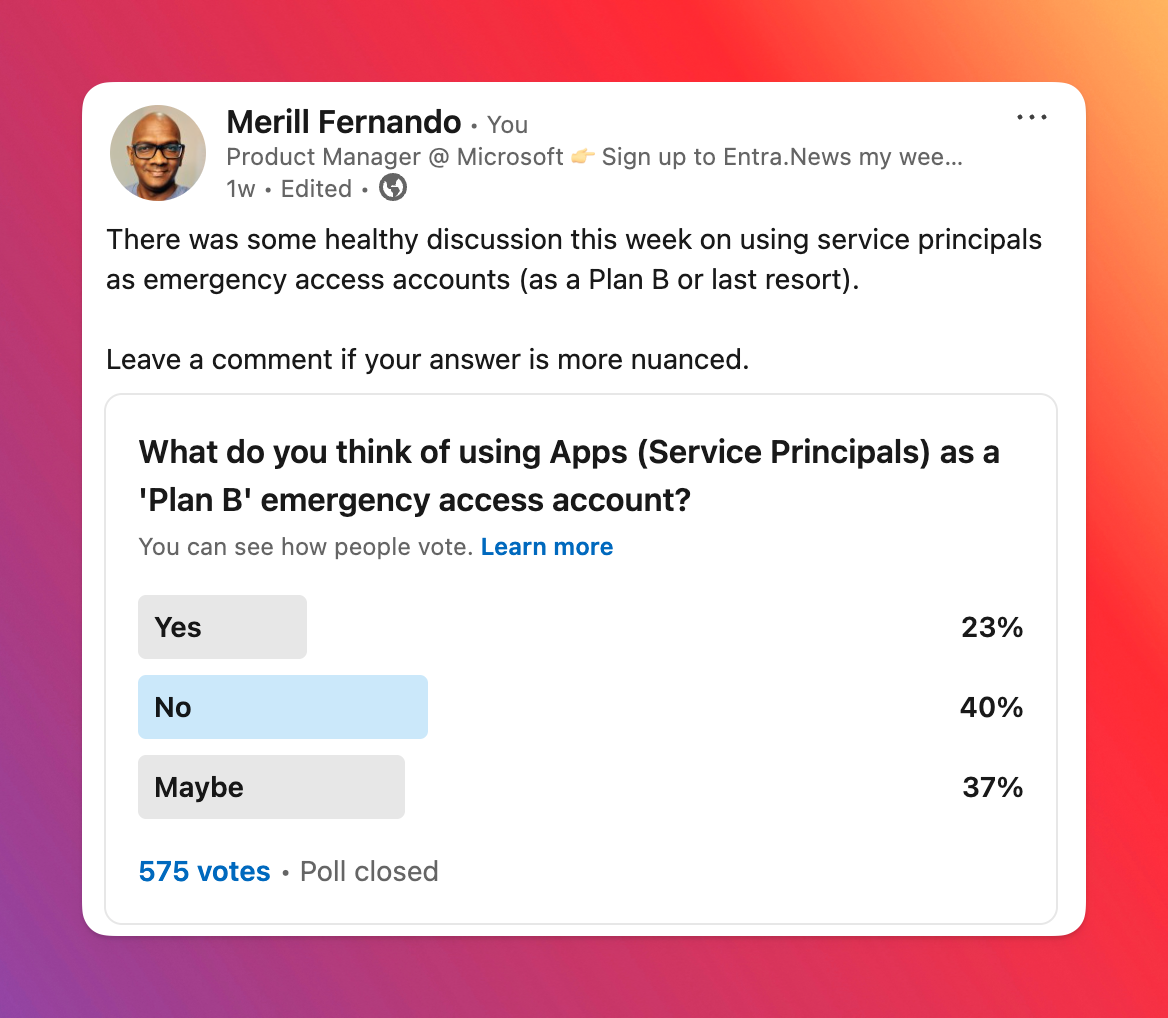
Here’s the combined results from the 817 votes.
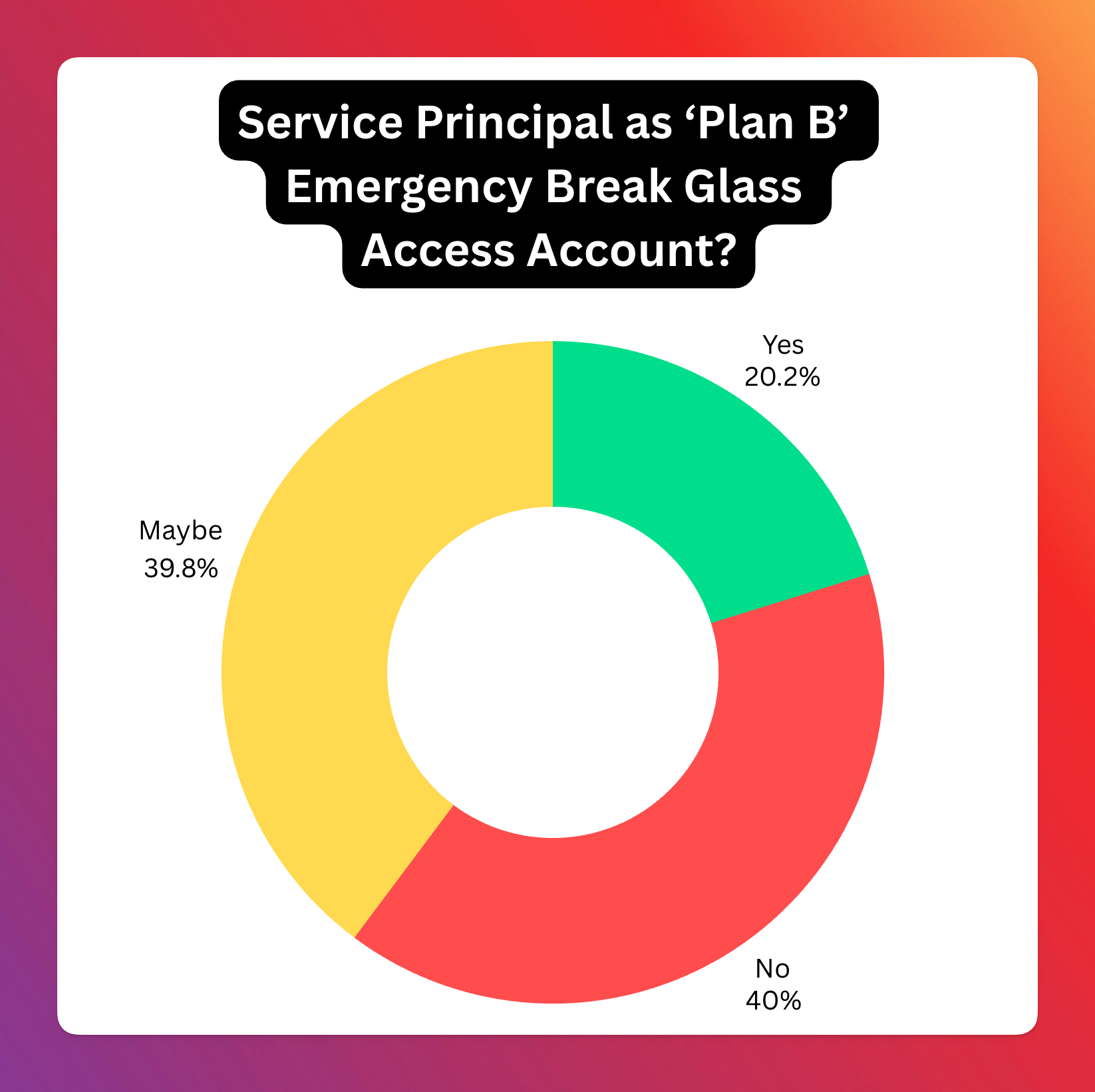
This split reflects the nuanced nature of the topic, with no clear consensus. In this blog post, I’ll break down the approach of assigning a Global Administrator (GA) role to an SP for emergency access, analyze the pros and cons based on community feedback, and share my personal take on the matter.
Why emergency access accounts?
Getting locked out of your Entra tenant is the stuff of nightmares for any IT administrator or security professional. Whether it’s a misconfigured Conditional Access policy, a lost or broken multi-factor authentication device, or an expired credential, the inability to access your critical cloud environment can bring operations to a grinding halt.
Microsoft’s recommendation has been to set up a “break-glass” or “emergency access” user account. These highly privileged accounts are kept under strict control, excluded from standard Conditional Access policies and secured with robust methods like FIDO2 keys stored securely offsite. Their usage is heavily monitored and alerts are triggered immediately upon sign-in.
But in the evolving landscape of cloud identity, a new idea has surfaced, sparking considerable debate: What about using an Application (specifically, a Service Principal) with Global Administrator permissions as an emergency access mechanism?
This approach hinges on the fact that Service Principals authenticate differently than users, often using certificates or secrets, which bypasses user-focused Conditional Access policies. The idea is to create a Service Principal, grant it the Global Administrator Entra role, and secure its credentials (ideally a certificate on a hardware security module like a YubiKey) and monitor its activity rigorously.
The earliest reference for this approach that I’ve seen is this reddit post from 2023 ‘Using Service principal as Azure AD Break glass access’. At that time I dismissed the idea, but lately I’ve seen quite a few posts on various forums where admins had locked themselves out of their tenant and it got me thinking about using SPs.
So that’s where the poll came in - “What do you think of using Apps (Service Principals) as a ‘Plan B’ emergency access account?” The results, based on 817 votes, were quite telling:
- Yes: 165 (20.2%)
- No: 327 (40.0%)
- Maybe: 325 (39.8%)
The poll results clearly indicate a significant level of hesitation or outright opposition to this approach. The combined “No” and “Maybe” votes represent nearly 80% of the responses, suggesting that while there’s some interest or recognition of potential edge cases (“Maybe”), the majority are either against it or highly skeptical.
Let’s delve into the lively discussion that followed to understand the reasoning behind these votes.
Analysis of Community Responses: The Pros and Cons Unpacked
Arguments Against (The “No” Votes and Skeptical “Maybe”s)
- Lack of MFA: Service Principals cannot natively perform multi-factor authentication in the same way a user account does. While certificate-based authentication is strong, it’s seen by many as not a direct equivalent to user+MFA.
- Credential Management Hell: The security relies entirely on credential security (secrets or certificates). Many expressed concern about managing these.
- Privilege Escalation Path: The
App AdministratorandCloud Application Administratorroles can manage credentials for Service Principals. If not tightly controlled (e.g., via PIM), an attacker could gain GA access. - Complexity and “Hackiness”: Adds unnecessary complexity that introduces risk.
- Lack of Dedicated Controls: No Restricted Administrative Units (RAUs) for Service Principals.
- Workload Identity CA Dependency: Many organizations haven’t implemented Workload Identity CA policies.
- Doesn’t Solve Core Problems: Doesn’t address root causes of lockouts (poor policy design).
Arguments For or Accepting in Specific Cases
- Bypassing Restrictive CA Policies: A Service Principal can circumvent user-based CA policies that might block all user sign-ins.
- MSPs and Scaling: Managing physical FIDO keys across numerous clients is logistically challenging. An SP approach could be more scalable.
- Requires a Robust Framework: Certificate on HSM, comprehensive monitoring, clear boundaries, protection against modification.
- Microsoft Should Build It: Microsoft should create a built-in, purpose-designed recovery account feature.
- Better Than Poor User Break-Glass: A well-implemented SP break-glass could be more secure than poorly secured user break-glass accounts.
Conclusion from the Responses
The community sentiment: Using a Service Principal with GA rights as a general break-glass is largely viewed with skepticism (combined 80% “No” and “Maybe”).
My Personal Opinion
(Personal opinion, not representing Microsoft)
I lean towards “Yes” for specific types of tenants:
- Increased Lockout Vectors: The ways to lock yourself out have proliferated.
- Difficulty of Recovery: Recovering access via Microsoft Support is difficult and time-consuming by design.
- Tenant Type Matters:
- Entra ID Free Tenants, M365 Dev tenants: (Yes) - No clear way to prove ownership.
- Customers with Enterprise Agreements: Diminished need (Maybe).
- Production tenants where your CEO can call Satya: Do you even need break-glass accounts?
Creating a Break-Glass Service Principal account
- Create Emergency Access Service Principal: Dedicated app. Multi-tenant SPs cannot be blocked by Workload ID CA policies in other tenants (today).
- Grant Entra GA role: Hard to predict what can go wrong; wide role needed.
- Secure Credentials with HSM Certificate: Generate CSR on a local HSM (YubiKey). Private key never leaves the HSM.
- Robust Monitoring: Immediate, high-priority alerting whenever the SP signs in. SIEM integration, KQL queries, multi-channel alerts.
- Redundancy for Monitoring: Separate, independent heartbeat check system.
Someday I hope to build a PowerShell module or an app that makes it super easy to set this up correctly and manage it.
References and further reading
- How to Configure an Emergency Access App in Entra ID - Lokesh
- M365 Breakglass Maturity Model - Graham Gold
- Attacker’s Breakdown: M365 Break Glass Maturity - Elli Shlomo